You don’t need a security team to sort out cyber security for small business. Five operational habits, the tools that back them up, and where to start today.
Your bank login. Your client Trello. Your invoicing tool. All guarded by the same password you made up in a hurry back in 2021.
Sound familiar? You’re not alone. Most of what gets filed under security is actually an operations problem wearing a disguise.
A few serious incidents hit small businesses hard in October and November. A popular hosting platform had customer secrets exposed. A widely used open-source tool for connecting to AI systems was tampered with, to steal login details from anyone who installed it. Neither business did anything obviously wrong. They just relied on a tool that got compromised, the same way you probably do, every single day.
That’s the genuinely useful bit of news in all this. The attack usually isn’t aimed at you specifically. It’s aimed at the tools thousands of small businesses depend on. Protecting your business from that is less about security know-how and more about the thing I already help founders with every week: knowing where everything lives, who can get to it, and what happens if one piece goes wrong.
What’s actually catching founders out?
I’m not a security specialist. I’m an operations one. But the pattern underneath almost every small-business security mess I’ve come across looks pretty familiar.
→ A password that’s been reused on three or four different accounts.
→ A scam link, clicked on a tired Tuesday afternoon.
→ A laptop left in a cafe, with nothing stopping anyone who picks it up.
→ A backup that technically exists, but nobody’s ever actually tried to restore it.
→ An AI tool given access to your inbox, your files or your calendar, with no limit on what it’s allowed to do with that access.
A few decent defaults fix nearly all of them. The same kind I’d normally help you build into a process anyway.
Cyber security for small business: what should you actually do?
Five things. Not everything at once, just these five, done properly.
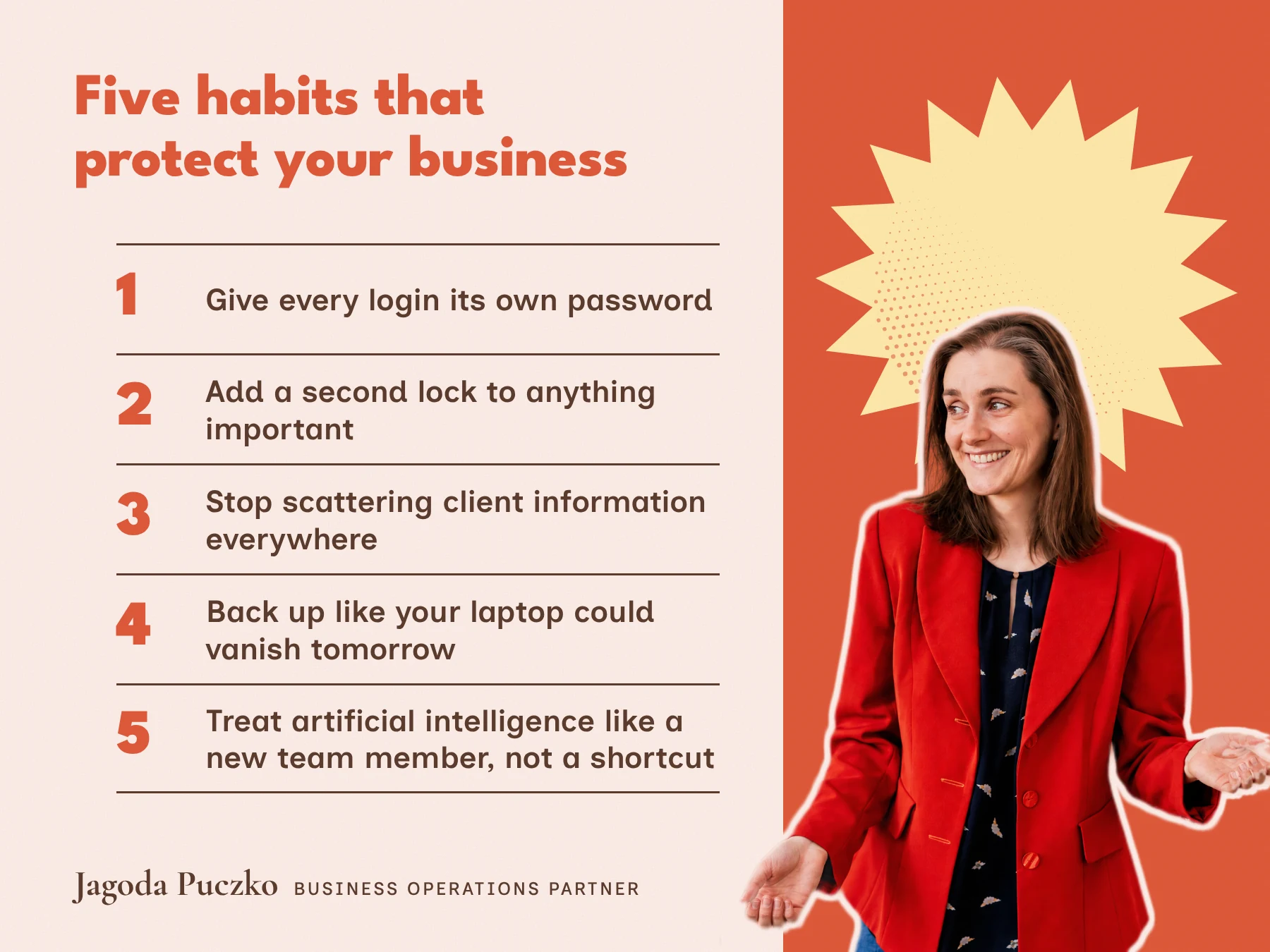
→ Give every login its own password. Not a variation on a theme, an actual, unrelated, hard-to-guess password for every tool. A password manager like 1Password or Bitwarden does this for you, so you’re not relying on memory or a notes app literally named passwords (do not share).
Do this today: put your email, your bank, your cloud storage and your client tools into a password manager.
→ Add a second lock to anything important. Usually called two-step verification. It means a stolen password alone isn’t enough to get in. Your email, banking, cloud admin account and password manager should all have it switched on, ideally through an authenticator app rather than a text message.
Do this today: turn it on for your business email first. That’s the one everything else gets reset through.
→ Stop scattering client information everywhere. Contracts in your inbox, invoices on your desktop, notes across three different WhatsApp threads. Pick one proper home for it, a shared drive or a Notion workspace, and give people only the access they actually need.
Do this today: search your inbox for the word contract and see how many of them should really live somewhere else.
→ Back up like your laptop could vanish tomorrow. A sensible rule here is three copies of anything important, on two different types of storage, with at least one copy offline or out of easy reach. The part everyone skips is testing it. A backup you’ve never restored is a guess, not a backup.
Do this today: try restoring one file. If you can’t, you’ve just found the gap before it found you.
→ Treat AI like a new team member, not a shortcut. It can save you hours. It shouldn’t have the keys to everything on day one. Don’t paste client contracts, financials or passwords into a free, unapproved tool, and if an AI assistant is connected to your email or files, make sure a human still has to say yes before it sends, deletes or pays for anything.
Do this today: write yourself a one-line rule. Something like: these are the tools we use, and client information never goes into anything else.
What’s actually worth paying for?
You don’t need all of this on day one. But if you’re going to spend money anywhere, I’d put it here.
→ For passwords: 1Password or Bitwarden. Both let you share logins with a team properly, instead of over WhatsApp. iCloud offers their tool, Passwords, and I’m also a huge fan of NordPass.
→ For the second lock: whatever’s already built into Google Workspace or Microsoft 365 covers email and cloud admin. A YubiKey is worth it if you want the strongest version.
→ For client files: a proper shared drive or Notion workspace with named access, not anyone with the link.
→ For backups: something like Backblaze for your devices, on top of whatever version history your cloud platform already gives you.
→ For AI: the business tier of whatever you’re using, Claude for Work, ChatGPT Business, Gemini in Workspace or Microsoft 365 Copilot, rather than a personal account with no admin controls at all.
What if something still goes wrong?
Have a rough plan before you need one. Working this out at eleven at night, mid-incident, is a terrible time to do it for the first time.
→ Decide who calls it. Usually just you, or whoever runs operations.
→ Know what to switch off first. Compromised email, cloud admin, and anything on the affected device.
→ Know how you’d reset access. Password resets, a fresh round of two-step codes, new keys for anything connected to AI tools or other systems.
→ Know who you’d need to tell. Any client whose information might be affected, and anyone else you’re contractually required to notify.
Writing this down takes fifteen minutes. Not having it written down costs a great deal more, on the one day you actually need it.
A few questions you might be asking
Do I need to hire a security company for this? No, not for most of this. A password manager, two-step verification and a tested backup are things you can set up yourself in an afternoon. A security company earns its fee once your business is bigger, more regulated, or handling genuinely sensitive data at scale.
What is the simplest way to protect a small business without a team? Start with the basics: a password manager and two-step verification on your email and bank accounts. Together they stop most of the problems in this post, and you can set both up in an afternoon without any technical knowledge.
Will any of this slow my team down? Slightly, for about a week, while everyone gets used to a password manager and the occasional six-digit code. After that it’s barely noticeable, and a lot less disruptive than explaining to a client why their contract ended up somewhere it shouldn’t have.
What if my AI tool already has access to everything? Go and check, properly. Most tools let you see and limit what they’re connected to. If you can’t see what it has access to, that’s the first thing to fix, before anything else on this list.
How much of this can I do for free, today? Most of it. Two-step verification is free. Testing a backup is free. Writing down a one-line AI rule is free. The only thing worth paying for straight away is the password manager, and even that has a free tier for one person.
The bottom line
A stolen password, a lost laptop or an AI tool with too much access can turn into a business-wide problem fast. A handful of boring habits, done consistently, is usually enough to stop that happening. None of them need a security qualification, just the same operational thinking I already help founders apply everywhere else in their business.
If this was useful, I write more like it on Substack most weeks. Subscribe here.
And if sorting this properly, alongside everything else running through your head, sounds like more than you want to take on alone, I’m always happy to have a chat about what that could look like. Book a call.
About me:
Blog
This section offers a summary of the blog, presenting a range of articles, perspectives, and materials to educate and motivate readers.
-
How to protect your business from a cyber attack (without hiring a security team)
You don’t need a security team to sort out cyber security for small business. Five…
-
Business only counts when it feels like a fire drill. But does it have to?
How to stop being a reactive business owner and run a growing business without the…
-

How to connect client onboarding to strategy and reporting
How one social media agency swapped scattered documents and emails for a single client onboarding…

Hi, I’m Jagoda Puczko. I’m a Business Operations Partner who helps growing founders build businesses that don’t live entirely inside their own heads, passwords included. I ran operations for teams of over 100 at Apple and Little Dot Studios before building my own, so I’ve seen complexity from both sides of the desk. Subscribe for more on running a calmer, steadier business.
This article shares general guidance based on current best practice. It isn’t a substitute for formal legal, financial or security advice tailored to your business.
Leave a Reply